Open WebUI
The ChatGPT-like interface for models that run on your own server. Multi-user, , , over your own documents — a concrete alternative to ChatGPT Enterprise and Microsoft Copilot for law firms and medical practices.
Project profile
Open WebUI
User-friendly AI interface for self-hosted models
As of: June 1, 2026
GitHub stars
139k
Forks
20k
Open issues
344
License
Open WebUI Lic.
Latest version
v0.9.5
Language
Python
What is Open WebUI?
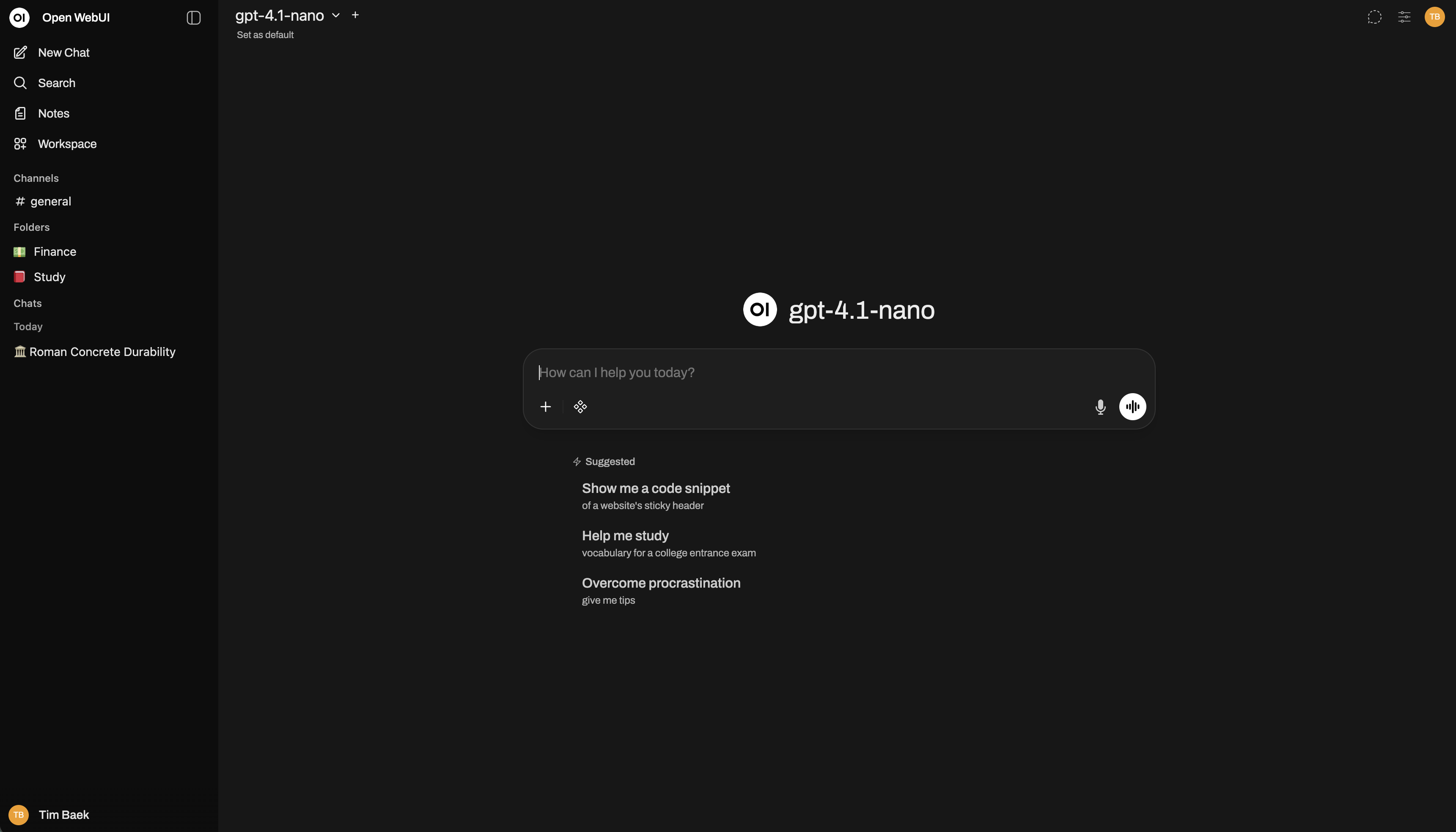
is a browser interface for your own models — comparable to the ChatGPT UI, but fully . Connects to , local models like Llama 3, Mixtral or Qwen, or optionally to OpenAI-compatible APIs. Multi-user with roles, workspaces, and connection to your own documents.
It runs entirely on hardware you control — an instance on the firm server or a workstation is enough. Client data does not leave the building. License: License based on BSD-3 — source code visible, up to 50 users fully usable including custom branding.
Why a law firm uses Open WebUI
In a law firm every sentence, every clause, every case note sits under § 203 of the German Criminal Code — breach of confidentiality is a criminal offence. ChatGPT, Claude, Copilot are technically excellent, but uploading a client file to OpenAI is not defensible under professional rules.
is the bridge: you keep the UX everyone knows from ChatGPT — chat window, model picker, shared workspaces — but everything runs on the firm server. No data outflow, no GDPR third-country issue, no conflict with bar association rules.
Client case study
Law firm Schäfer Rechtsanwälte
Eight people — two partners (corporate law, family law), two associates (tenancy law, employment law), two trainees, two paralegals. Six requirements were the brief — setup delivered in 8 consulting days, training and handover in 2 more.
§ 203-compliant AI usage
Role and permission separation
Audit log for BRAO compliance
Internal case database as RAG source
House style for briefs
Conflict check before accepting a mandate
What the firm now does with it
Eight productive that have been live for two quarters. Every query is written to the , every use is role-correctly scoped.
Draft claim from a case file
Contract analysis (NDA, T&Cs, lease)
House-style check on a brief
Mandate conflict check
Case-law research, internal DB
Structure a meeting dictation
T&Cs clause search across the portfolio
Client letters
Core capabilities of Open WebUI
What delivers technically — and which of these capabilities actually carry the firm setup.
Multi-model routing
RAG with hybrid search
Pipelines (custom Python)
RBAC with audit log
OpenAI-compatible API
Multi-user with workspaces
Honest alternatives
If Open WebUI is not a fit — what else?
Three cloud platforms on the market. Each is technically strong, but each stores client data outside the firm. Honest framing here — no marketing romance.
Frontier model (USA)
ChatGPT Enterprise
OpenAI, USA
- + Best model quality on the market
- + Very easy entry, excellent UX
- − US cloud hosting (§ 203 / BRAO critical)
- − From 25 users, around $60 per user per month
Frontier model (USA/EU)
Claude Team
Anthropic, USA / EU endpoint
- + Very strong on longer legal texts
- + EU endpoint available for German customers
- − Still no self-hosting option
- − $30 per user per month, from 5 users
Office integration (EU)
Microsoft 365 Copilot
Microsoft, EU+US cloud
- + Deep integration into Outlook / Word / Teams
- + EU Data Boundary available
- − Still Microsoft cloud, no real sovereignty
- − 30€ per user per month, M365 licence required
Rule of thumb for law firms and medical practices: wherever § 203 StGB, BRAO or medical confidentiality apply, is the only clean answer. For purely general work (research, texts without client reference) a cloud with a DPA is also possible — but never mixed.
Pricing
Self-hosted. RBAC. No client data outflow.
License
Open WebUI License (BSD-3 based + branding clause): source code public, self-hosting free of charge. Up to 50 end users, custom branding (firm logo, own colours) is also permitted. Above 50 users: keep the branding or arrange a commercial agreement.
Running costs
Hardware-dependent. With an Apple Silicon Mac or GPU workstation on your own infrastructure: electricity + maintenance. On a VPS with GPU attachment: roughly 80–200 €/month. No per-seat licence fees.
Effort
Docker Compose setup with a local model: 30 minutes. Firm setup with RBAC, RAG sources, pipelines, audit configuration and staff training: 5–10 consulting days.
The License is not OSI-approved open source in the classic sense — it is BSD-3 plus an additional branding-protection clause. For SMBs up to 50 users, practically unlimited use including your own look and feel. For larger setups or commercial resale: clarify upfront with Inc.
Related topics
Open WebUI rarely fits on its own
It is the chat UI on top of the stack. Models run next to it (, vLLM), workflows are orchestrated by , hosting happens on your own hardware. The full picture:
Ready for the next step?
Free intro call, no strings attached. In 30 minutes you'll know whether and how AI can help your business.